


Disclosure: Although Strata competes at some level with the tool reviewed here, our goal is to provide the least biased review possible. The point of this series is for us to understand the market offering better and bring you all along.
Setup and Install
Couldn’t be easier to get started. Simple docker run command gets started instantly. You can easily see directions on the install page for production deployments. We won’t be doing a production run but the rollout looks as easy. The only difference is the environment variables for database configuration.
Once up and running you can head to the browser at localhost:3000. You are treated to a delightfully simple initial setup process. Just basic account info and the first db you want to connect to.
The Test Environment
We are testing with the standard TPC DS data warehouse (small size, 1gb) on AWS Athena.
Our interests lie largely with the semantic layer which in Metabase is the “Models” section of the app. While Metabase has many features we are focused on evaluating it primarily from the perspective of a non technical user. Of course, non tech users can’t setup a Metabase instance from scratch. Instead, we are considering the effort it takes for a data engineer or someone technical to setup and enable a non technical analyst.
Modeling Metrics
As you can guess we are learning as we go. We’ll do our best to click our way through the UI before resorting to docs.
“Models” and “Metrics” are separate concepts in Metabase.
Metabase Models
These are basically preconfigured joins and filters that you can the use as virtual tables. Another way to think of them is as View definitions that live inside Metabase. The idea is that complex joins and messy data issues can be resolved at the Metabase layer using models. This includes calculating reusable custom columns and removing erroneous data. Similar to how you would use a view but with query a builder UI.
Unfortunately, it has all the drawbacks of a view as well. As far as I can tell there is no join pruning. Meaning, all the joins you define in the model gets applied every time even when no columns for a joined table are used. Additionally, every single column is selected in the joined table. Of course, some of our modern database engines will know to prune unused projections but the joins will be executed every time.
It is relatively easy for a moderately technical person to construct a model. It is sufficient to understand that tables can be joined, what the correct join keys are, and know enough sql to validate output queries. You would need a bit more SQL knowledge for advanced sql expressions (ie. custom joins, and complex calculations).
Building models would be easy for a data engineer or analytics engineer but pretty challenging for non technical users.
Metabase Metrics
You can define a metric from a single table or via joined set of tables. These metrics can have a custom expression. This is great for cases when you need to encode a complicated formula for reuse. An example could be to precisely define an active user as one with active_flag = 1 and grace_period is null. The referenced columns could be from one of the joined tables.
The limitation is if you need to create measures across fact domains at different grains. We could not see an easy way to do this without a fact to fact join. A question from a question seems like the right place but the generated sql was not right. Please let us know in the comments if this can actually be done.
Metabase Measures
Honestly this was a bit confusing. Its very similar in structure and UX as metrics above. Measures seem to be more primitive with no ability for one to derive it from joins or use custom filters. They appear to be a low level primitive.
Modeling Summary
The Metabase “semantic layer” is minimal at best. To be fair they don’t claim to have one. We are instead focusing here on what they call “modeling” and evaluating it as sort of light semantic layer. In general the concept of a model in Metabase is meant for reuse and some level of governance. So we think it is fair to evaluate it as such.
Speed to first visualization seems to be what Metabase was going for and they hit it out of the park on that. The tradeoff is that the target users have to be quite technical to effectively use the tool. Non technical users will have a hard time becoming active participants in creating analytics.
Building a Visualization
As typical with most BI tools the first step is to choose a table or model. Once the base model is selected we have to add additional tables needed to satisfy our question. This means you need to know how to join tables and what a legal join is. This setup process seems like it could pair well with something like Semantic Views or MetricFlow (dbt).
Next, you choose a column to aggregate and choose columns to group by. These could be custom expressions. Execute and you have a beautiful chart.
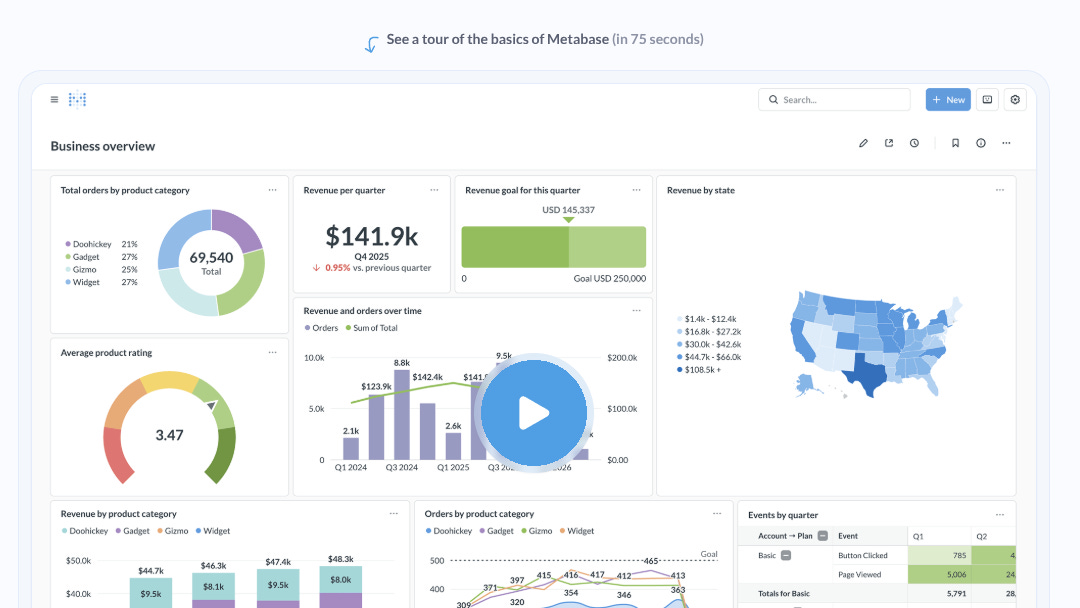
Going from nothing to a useful custom chart is as easy as anything you can do with Tableau. Once you have a chart it’s easy to add it to a dashboard. Rinse and repeat until you have a sophisticated view.
Dashboards
Dashboards allow you to create tabbed views and add interactive filters. This was a bit difficult but that is the case in most BI tools. All of the typical visualization types were available but wasn’t comprehensive. In fact, only the basics are covered. They do have an admin driven custom visualization option, but we did not explore it much.
Creating a custom layout of various visualizations and sections were quite easy. Simple snap to grid model via drag handles.
I did find the ability to add additional data (via secondary query) to an existing visualization quite compelling and easy. This allows you to add custom series with unique setup. For example, you can show total trending line along with series breakdown by item category. The only nit is that you need a pre existing model and cannot do this from a new query builder flow.
Summary
Metabase is a great option for small teams and small data warehouses. The reason I’m focusing on “small” is that for most users in large companies, Metabase presents a technical hurdle. Almost at every turn with a complex warehouse you would need to understand the table/model, understand how tables can be joined, and understand basic sql to be productive here. In practice, this leans heavily on technical users to make good use of. I would bet Metabase users rely heavily on custom sql rather than the query builder.
However, for other smaller organizations this is an excellent free option to get essential analytics for your company. Easy to start, easy to deploy, and easy to use for technical users.